Verified August 27, 2026: Pinterest provides controls to see fewer GenAI Pins in certain recommendation categories, but it does not promise a universal switch that removes every AI-generated image from every search result. Labels also cannot identify every generated or heavily modified image with certainty.
The practical goal is therefore twofold: reduce unwanted recommendations where Pinterest offers a control, then verify the source of any image you intend to trust, buy from, cite, or use in a real project.
Use the available GenAI preference first
Open Pinterest settings and look for the current recommendation or GenAI interests controls. Pinterest's AI documentation says users can refine recommendations to see less AI content in certain categories. Wording and availability can vary by platform, account, category, and rollout.
Treat “see less” literally. It is a preference signal, not a guarantee, a retroactive cleanup of boards, or a search-wide exclusion operator.
Do not treat visual clues as proof
Common warning signs include malformed text, impossible reflections, repeated textures, inconsistent hands or hardware, physically implausible construction, and a creator profile that posts hundreds of unrelated styles. These are reasons to investigate, not reliable authorship tests. Real photographs can contain editing artifacts, while generated images can look consistent.
Use the Pinterest label when present, but verify independently when the origin matters.
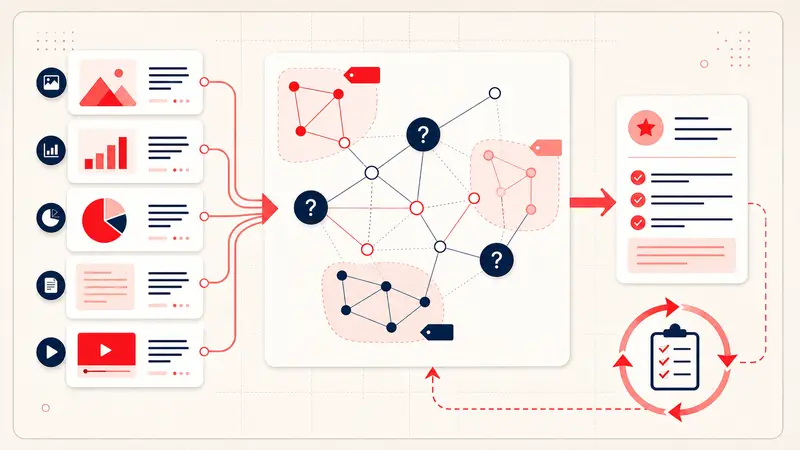
Apply the source-first test
- Open the Pin close-up and inspect any GenAI or modification label.
- Open the destination page instead of trusting the image alone.
- Look for a named creator, publication date, project description, product model, or process photographs.
- Search the creator or exact project name outside Pinterest.
- Use a reverse-image search to locate older copies or the likely original.
- Check whether the destination actually contains the image and supports the Pin's claim.
A destination consisting only of scraped images, generic prose, aggressive redirects, or unrelated shopping links is not strong evidence, even if the image itself is real.
Search for provenance, not just appearance
Replace broad aesthetic searches with terms a real source is likely to publish:
- designer, architect, photographer, museum, manufacturer, or publication name;
- project name, city, material, technique, model number, or year;
- “process,” “before and after,” “floor plan,” “specification,” or “case study” when those formats fit the research;
- the original-language term for a regional craft or object.
If Pinterest keeps overriding the words you enter, use the controlled search-relevance diagnostic.
Retrain recommendations without erasing useful research
Use “hide” or “not relevant” on clearly unwanted recommendations, review the activity that Pinterest uses for personalization, unfollow sources you no longer trust, and keep questionable material out of important boards. Change one signal family at a time so you can observe the result.
Do not delete an entire long-term board merely because recommendations are temporarily poor. If the board contains project evidence, export or document it first using the Pinterest backup workflow.
Build a verification note for important Pins
Origin: creator or organization
Original URL:
Creation method: confirmed, disclosed, suspected, or unknown
Evidence: label, process page, older publication, product record
Usable for: inspiration, citation, purchase, or implementation
Checked: date
“Unknown” is an honest and useful status. The note prevents an attractive but unverified image from silently becoming a factual reference later. The Pinterest research workflow explains how to separate visual inspiration from evidence.
Special rules for purchases and physical projects
- Products: verify the model on the manufacturer or authorized retailer site.
- Architecture and interiors: verify dimensions, materials, structural feasibility, codes, and authorship outside the image.
- Recipes: require a complete ingredient list and coherent method from a credible source.
- Travel: verify that the place exists, is accessible, and matches current official information.
- Health or safety: do not treat a Pin as professional guidance.
Report policy violations, not content you merely dislike
Pinterest says its Community Guidelines apply regardless of how content was created. Report impersonation, scams, unsafe content, or another specific violation through the relevant reporting flow. Do not file policy reports solely because an image appears to be generated.
A trustworthy visual library is curated, not merely filtered
No automated filter can establish provenance for you. A resilient library records the source, confidence level, and intended use beside every consequential reference. That work takes seconds per finalist and protects hours of later research.
Keep building your Pinterest system
Continue with the guide that matches your next step:

Get the Notestopin Chrome extension
Add private notes to any Pin, tag them, and search your saves later.
Add to Chrome