Pinterest moodboards are a standard tool in design, planning, branding, and content work. They are fast to assemble, visually persuasive, and easy to share. The problem is that most moodboards communicate taste without communicating intent. A client can look at a board and say “nice” while completely missing what you wanted them to notice. They may approve an image for the wrong reason, reject an image because of an irrelevant detail, or assume you are proposing a literal copy when you are only referencing a small element.
This mismatch happens because visual references are ambiguous. A single pin contains many signals at once: lighting, composition, palette, materials, proportions, layout, styling, and mood. Designers can isolate the important signal instantly because they have trained eyes. Clients do not. They interpret the whole image as one package.
The fix is not to send more pins. The fix is to send context. When you attach a clear explanation to each key pin, you turn a moodboard into a communication tool instead of a guessing game. Context bridges the gap between your eye and their understanding.
Why clients miss the point of Pinterest boards
Clients are usually trying to answer different questions than designers. The client often wants to know “what will my final result look like” while the designer is using pins to communicate “what direction should we take” or “which elements should guide the work.” When the board is shared without explanation, the client defaults to the most literal interpretation.
Common failure patterns:
- The client fixates on furniture or objects when you were referencing lighting or composition.
- The client dislikes a single surface or color and rejects the pin even though the core idea was layout or texture.
- The client assumes the board represents an exact shopping list, not a style direction.
- The client says “I like all of it” because they cannot articulate what they like, which provides no decision signal.
- The client requests a mashup of many pins that are not compatible, because the constraints were never stated.
All of these issues are communication issues, not taste issues. They are solved by guiding attention, framing what is relevant, and labeling what is not.
Moodboards that work behave like annotated references
A professional moodboard should do more than show images. It should explain the direction. It should highlight the specific attributes you want to carry forward, and it should warn the viewer about the attributes that are not part of the recommendation.
Think of a good moodboard as a set of claims:
- This is the lighting mood we want.
- This is the palette temperature we should stay within.
- This is the material story that fits the brand.
- This is the level of contrast and visual density that feels right.
- These are the elements we are explicitly avoiding.
Notes and tags are how you turn pins into claims.
Annotating for others: tell them what to look at
The highest leverage note you can write is a directional instruction. It tells the client where to focus and what to ignore. This prevents misunderstanding and reduces decision cycles.
Examples of annotation language that works well with clients:
- “Focus on the lighting softness, ignore the furniture style.”
- “This is about the palette and warmth, not the layout.”
- “We want this type of texture contrast, but with simpler shapes.”
- “Reference the typography weight and spacing, not the illustration style.”
- “This shows the mood, but we will use your brand colors.”
Notice what these notes do. They reduce ambiguity. They separate signal from noise. They also help clients provide more useful feedback, because they can react to the correct element.
Use constraint notes to prevent unrealistic expectations
Clients often say yes to a pin without understanding constraints like budget, timeline, size, or technical feasibility. If you want your board to drive real decisions, attach constraints to the pins that are likely to create misalignment.
Practical constraint notes:
- “This effect requires custom fabrication, higher budget.”
- “This is a premium material, we can approximate with a lower cost alternative.”
- “This layout only works with large windows, we will adapt for your space.”
- “This photo uses professional lighting, we will target a similar feel with practical fixtures.”
- “This is a concept reference, not a direct copy.”
Constraints do not reduce enthusiasm. They reduce surprises. They also increase trust, because clients can see that decisions are grounded.
Build a pin level explanation system: what, why, and how
If you want a repeatable method, use a simple three part note structure for your key pins.
- What: what element of the pin matters
- Why: why it fits the project goal or client preference
- How: how you would translate it into the client’s context
Example:
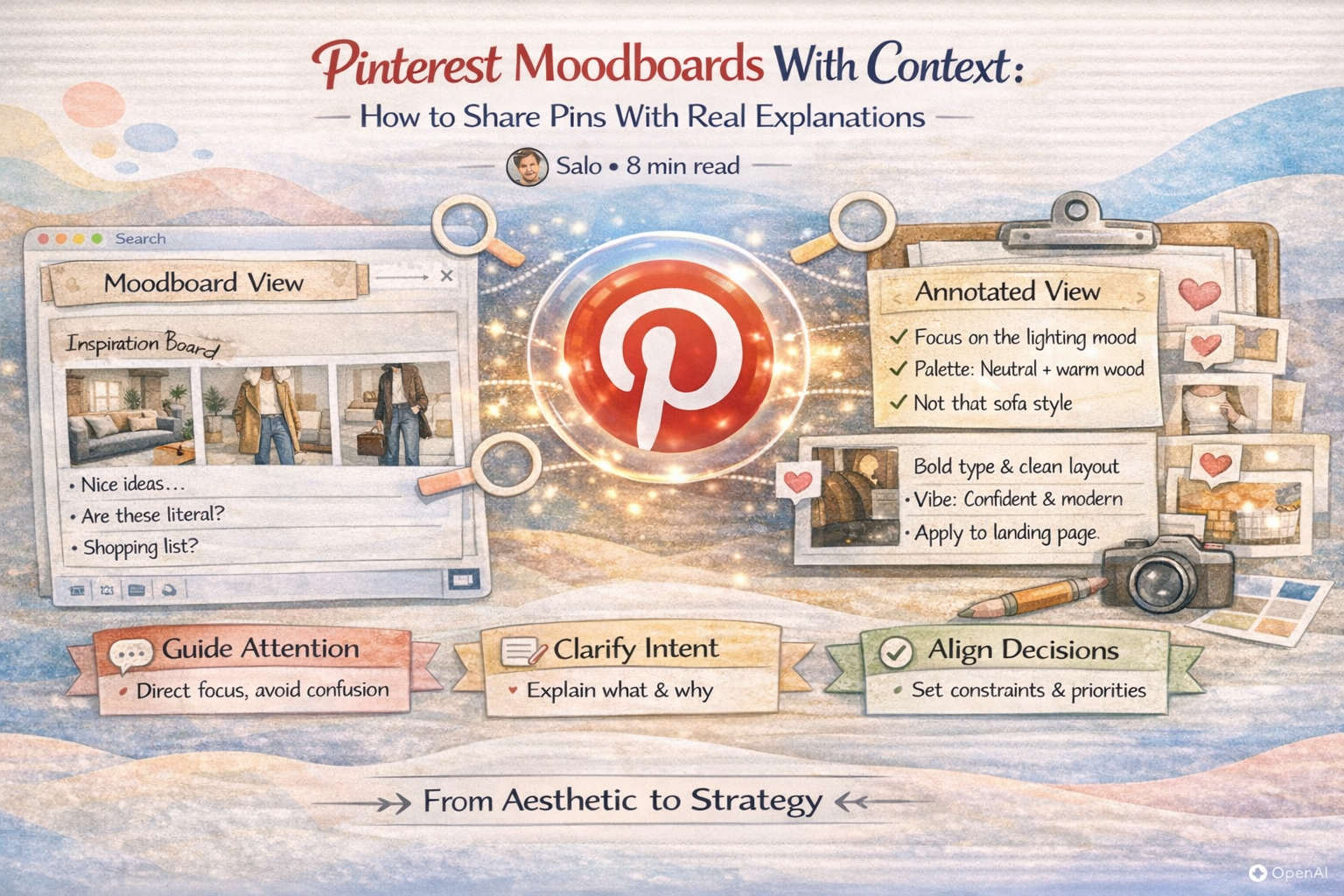
What: warm indirect lighting and soft shadows | Why: matches calm hospitality vibe | How: use wall sconces and dimmable lamps, avoid harsh overhead
Another example for branding:
What: bold type hierarchy and generous spacing | Why: feels confident and premium | How: apply to landing page headings, keep body copy simple
This structure makes your notes easy to write and easy to read. It also forces clarity in your own thinking.
Tagging moodboards by project, phase, and decision type
Notes explain individual pins. Tags organize the system so you can share the right subset with the right person at the right time.
A practical tag system for client moodboards:
- Project tags: client name or project code
- Phase tags: discovery, concept, refinement, final
- Decision tags: palette, lighting, materials, layout, typography
- Status tags: shortlist, approved, revise, archive
With tags, you can instantly filter to “concept plus lighting plus shortlist” and present a clean set of references instead of overwhelming the client with everything you saved.
The screenshot method: share the pin and the reasoning together
Pinterest boards are visual, but they are not built for structured explanation. If you send a client a raw board link, they will scroll quickly, absorb the wrong details, and respond with vague feedback.
A more effective approach is to share a view where your notes are visible next to the images. With Notestopin, you can open your dashboard, filter to the relevant project tags, and view pins with your private notes displayed alongside them. Take a screenshot of that view and send it to the client.
This changes the communication dynamic immediately. The client sees the reference and the explanation in one glance. They understand what is being proposed and why. You also reduce meeting time because you spend less time translating your own intent verbally.
Context bridges the gap between your eye and their understanding.
What to include when you share annotated moodboards
To make the shareable artifact effective, include:
- A small number of curated pins, not the full archive.
- One sentence notes that guide attention, not essays.
- Clear labels for what is in scope and what is out of scope.
- A shortlist tag that shows what you recommend as top candidates.
- A request for specific feedback, like choose three favorites and explain why.
This makes feedback actionable. It also reduces the risk that a client approves a pin for the wrong reason.
How Notestopin turns moodboards into client communication tools
Notestopin is designed for the exact gap that causes moodboards to fail: the absence of context. You add private notes to any pin, tag them by project and decision type, and search your saves later. That means your creative process stays fast, but your client communication becomes structured.
Instead of sending a raw Pinterest board and hoping the client sees what you see, you send a filtered set of pins with explanations attached. You can show reasoning, constraints, and priorities in a way that is easy to digest. This reduces revisions, reduces confusion, and leads to faster approvals.
Conclusion: moodboards work when they communicate intent
Pinterest boards without context are easy to misinterpret. Clients may say “nice” but still be unsure, because they do not know what they are supposed to notice. Annotated moodboards solve that by guiding attention, clarifying what matters, and stating constraints.
If you want a quick upgrade, take your next client board and annotate the top ten pins with one sentence each: what to focus on and what to ignore. Tag the best options as shortlist. Then share a screenshot view where the notes appear next to the images. You will get clearer feedback, faster decisions, and fewer revision cycles.

Get the Notestopin Chrome extension
Add private notes to any Pin, tag them, and search your saves later.
Add to Chrome