Pinterest is one of the most powerful inspiration platforms ever built. It is visually rich, fast, and endlessly scrollable. For home decor, recipes, fashion, travel, business ideas, and renovation projects, it feels indispensable.
But there is a hidden problem.
Pinterest is exceptional at helping you discover ideas. It is weak at helping you execute them.
If you have ever saved dozens of pins for a project and later felt overwhelmed trying to choose one, you have experienced the gap between inspiration and execution.
The Core Problem: Pinterest Optimizes for Discovery, Not Decisions
Pinterest is designed to show you more ideas. Its algorithm rewards engagement and exploration. The interface encourages you to save quickly and move on.
What it does not encourage is structured thinking.
When you save a pin, Pinterest stores:
- The image
- The title
- The link
What it does not store by default is your reasoning.
Why did this matter? What constraint did it satisfy? What decision were you leaning toward?
Without that context, saved pins become visual bookmarks with missing intelligence.
Inspiration vs Execution
Understanding the difference between inspiration and execution clarifies why most Pinterest workflows fail.
Inspiration is broad
- Modern kitchen
- Neutral bedroom
- Healthy dinner ideas
- Capsule wardrobe
- Outdoor patio upgrade
Execution is constrained
- Cabinet height must be 36 inches
- Sofa cannot exceed 84 inches wide
- Budget under $1,200
- Dairy free ingredient swaps required
- Must ship within two weeks
Execution requires filters. It requires trade-offs. It requires comparisons.
Pinterest does not provide structured tools for that layer.
Why Boards Alone Do Not Work
Many users try to compensate by creating more boards.
Instead of one kitchen board, they create:
- Kitchen layout
- Kitchen lighting
- Kitchen cabinets
- Kitchen budget ideas
This adds surface organization but does not solve retrieval or decision clarity.
Boards are single-category containers. Real projects are multi-dimensional.
A single sofa pin may relate to:
- Living room renovation
- Pet friendly fabrics
- Under $1000 options
- Neutral color palette
Boards cannot represent all those relationships at once.
The Real Cost of Poor Execution Systems
When Pinterest is used without structure, three things happen:
1. Rework
You repeatedly open the same pins and rethink the same comparisons because your earlier thoughts were never recorded.
2. Decision Fatigue
Without written constraints, every revisit feels like starting over. That drains cognitive energy.
3. Project Stall
Collecting ideas feels productive. Choosing feels risky. Many projects remain in perpetual inspiration mode.
This is why Pinterest often becomes a digital mood board archive rather than a planning tool.
The Missing Layer: Context
Execution requires preserved context.
Every saved pin should answer at least one of these questions:
- Why did I save this?
- What constraint does it meet?
- What are its trade-offs?
- How does it compare to alternatives?
- What is the next action?
Without that layer, Pinterest is memory dependent. With that layer, it becomes system driven.
A Practical Execution Framework for Pinterest
Here is a structured workflow that transforms Pinterest from inspiration tool to execution engine.
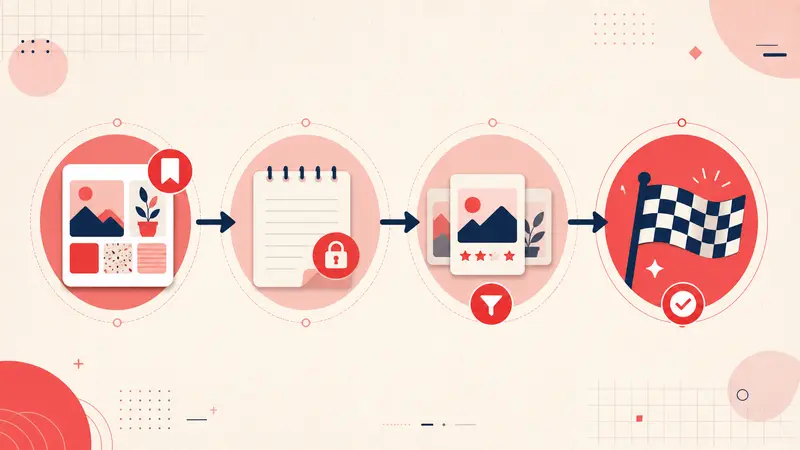
Step 1: Annotate Immediately
When you save a pin, add one sentence explaining why it matters.
Examples:
- “Fits 8x10 rug requirement.”
- “$980, cheaper than competitor.”
- “Good layout but limited upper storage.”
- “Reduce salt by half if cooking again.”
This takes less than 20 seconds but saves hours later.
Step 2: Tag by Constraint, Not Theme
Most people tag by category. That is not enough.
High value tags represent decision filters:
- #under1000
- #smallspace
- #petfriendly
- #needscomparison
- #finalchoice
Constraint-based tagging allows you to filter your saved pins when it is time to act.
Step 3: Compare With Stored Reasoning
When you are ready to choose, filter by tags and read your notes side by side.
Instead of relying on memory, you rely on recorded evaluation.
This dramatically reduces cognitive load.
Step 4: Record Final Decisions
Once you make a choice, document why.
For example:
- “Chose this one because delivery time is shorter.”
- “Best balance of price and durability.”
This prevents second guessing and creates a reusable knowledge base.
Execution in Real Scenarios
Kitchen Renovation
Without notes:
- 40 saved kitchen pins
- No structured comparison
- Repeated evaluation
With notes and tags:
- Pin A too expensive
- Pin B wrong dimensions
- Pin C meets budget and layout constraints
The project moves forward instead of stalling.
Recipe Planning
Without notes:
- You forget which substitutions worked
- You reread ingredient lists weekly
With notes:
- “Use corn tortillas.”
- “Prep time closer to 45 minutes.”
- “Family rating 8 out of 10.”
Your saved pins become a personalized cookbook.
Shopping Research
Without notes:
- You compare prices manually every time
- You forget return policies
With notes:
- “Price dropped to $899.”
- “Free returns within 30 days.”
Now your boards function as a research archive.
Why This Matters for Productivity
Productivity is not about saving more content. It is about reducing friction between idea and action.
Execution requires three elements:
- Constraints
- Comparisons
- Decisions
When you layer notes, tagging, and search on top of Pinterest, you introduce all three.
The platform stops being purely inspirational. It becomes operational.
The Shift From Collector to Builder
Most Pinterest users are collectors.
High leverage users are builders.
Collectors accumulate images.
Builders record reasoning.
Collectors scroll.
Builders filter and decide.
The difference is not volume. It is structure.
Final Thoughts
Pinterest is excellent at helping you imagine possibilities.
But imagination alone does not complete a renovation, cook a meal, or finalize a purchase.
Execution requires preserved context.
When you annotate pins, tag by constraint, and search your saved reasoning, Pinterest becomes more than a mood board.
It becomes a decision system.
And that is when ideas turn into outcomes.
Get the Notestopin Chrome extension
Add private notes to any Pin, tag them, and search your saves later.
Add to Chrome