Building a browser extension that adds private notes to Pinterest sounds simple on paper: inject a button, open a small editor, save text locally. In practice, Pinterest is a modern, highly dynamic application with heavy client side rendering, aggressive virtualization, and frequent UI changes. If you want your extension to feel native, stay fast, and avoid breaking as Pinterest evolves, you need to make careful choices in both architecture and UX.
This article is a technical breakdown of how to build a Pinterest notes extension, with emphasis on tech stack decisions, DOM integration strategy, and user experience patterns that work on a large single page application. The goal is not to copy one specific implementation. The goal is to understand the constraints and design an extension that is stable, performant, and pleasant to use.
What you are building
At minimum, a Pinterest notes extension needs five capabilities:
- Discover pins currently visible in the feed, search, or board grid.
- Attach a UI affordance to each pin, usually a small button or icon.
- Open a lightweight editor for a specific pin that supports notes and tags.
- Persist data locally and reliably, keyed to a stable pin identifier.
- Provide search and filtering over the saved notes, ideally in a dashboard UI.
The hard part is not the editor. The hard part is pin identification and UI attachment on a virtualized, changing DOM.
Tech stack choices that matter
Extensions fail when they fight the host site. Pinterest is heavy. It loads a lot of scripts, does frequent re renders, and recycles DOM nodes as you scroll. Any extension that adds a large framework bundle or expensive rendering logic will amplify performance issues and feel intrusive.
A minimal, performance first stack is usually the right choice.
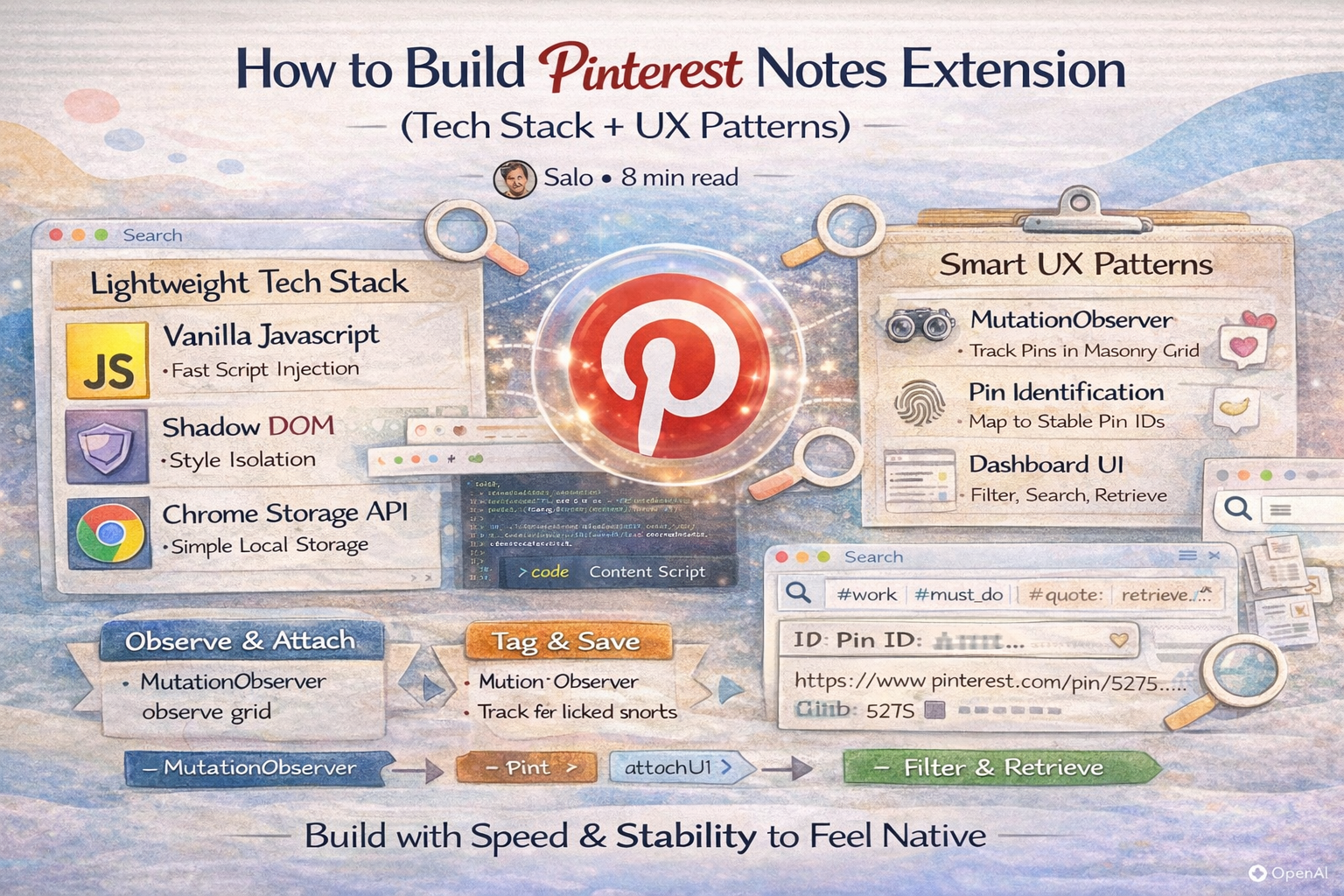
Vanilla JavaScript for injection code
Using vanilla JavaScript for content scripts is not about ideology. It is about control and payload size. You want your injection layer to do one thing well: observe the page, find pins, and attach small UI elements. Frameworks add weight and lifecycle complexity that you do not need inside a content script.
You can still use a framework for an extension owned surface like a dashboard page, but many teams keep the injection layer framework free for speed and resilience.
Shadow DOM for style isolation
Pinterest uses a complex design system with many global styles. If you inject regular HTML nodes, you risk two issues: your styles leak into the page, and the page styles break your component. Both cause unpredictable UI and support headaches.
Shadow DOM solves this by isolating style scope. You mount a shadow root on a host element and keep your CSS inside it. Your button and editor stay visually consistent even when Pinterest changes its styles.
Practical tips:
- Prefer closed or open shadow root based on debugging needs, but always treat the shadow boundary as part of your contract.
- Keep CSS minimal. Avoid complex selectors and heavy effects.
- Ensure focus styles and keyboard navigation remain accessible.
Chrome Storage API as the local database
For most note and tag use cases, the Chrome Storage APIs are sufficient. They provide persistence, synchronization options depending on the namespace, and are easy to use from content scripts and extension pages.
Design considerations:
- Use chrome.storage.local for large datasets and fast access without sync quotas.
- Use chrome.storage.sync only if cross device sync is essential and your data fits within quotas.
- Store data keyed by a stable pin ID, not by URL alone.
- Maintain a small index for search, like arrays of tags and normalized tokens.
When storage scale grows, many teams migrate to IndexedDB via a small wrapper, but Chrome storage is a reasonable first version if you manage indexing carefully.
Pin identification: your system lives or dies here
A note is only useful if it reliably stays attached to the correct pin across sessions. This requires a stable identifier. Pinterest pins often have IDs embedded in URLs, attributes, or data objects. Your task is to extract a stable key that does not change when a pin is repinned, shown in different feeds, or rendered in different layouts.
The design goal is simple: given any pin tile or pin detail view, derive a consistent identifier for the same underlying pin.
In practice, you often use a layered strategy:
- First, attempt to parse a pin ID from the pin link href.
- If unavailable, look for data attributes that include pin identifiers.
- If the tile uses internal routing, inspect accessible props embedded in DOM attributes.
- As a last resort, use a composite fingerprint, like canonical URL plus image hash, but treat it as unstable.
Stability matters more than elegance. You want the ID extraction to survive UI changes, so keep it defensive and measured.
The challenge: virtualization and the moving DOM
Pinterest uses a virtualized masonry grid. As you scroll, tiles are created, reused, and destroyed. This improves performance for Pinterest, but it makes injection tricky. If you attach a button to a DOM node and that node is later recycled to represent a different pin, your button will point at the wrong item unless you track state carefully.
This is why naïve approaches fail. You cannot assume that once you found a tile, it stays the same tile for the same pin.
A robust solution usually includes:
- MutationObserver to detect when new tiles appear or change.
- State mapping between tile elements and pin IDs so you can rebind or detach UI correctly.
- Idempotent mounting so running your attach routine multiple times is safe.
- Cleanup logic to remove listeners when tiles are removed or repurposed.
The engineering principle is to treat Pinterest’s DOM as an event stream, not a stable tree. Your extension should continuously reconcile what is on screen with what UI should exist.
MutationObserver patterns that work
MutationObserver can be expensive if you observe too broadly or process too frequently. The goal is to observe a narrow container and batch your work.
Practical patterns:
- Observe the main grid container rather than the entire document.
- Debounce processing using requestAnimationFrame or a short timer to batch many mutations.
- Process only added nodes and nodes whose subtree includes pin tiles.
- Avoid deep queries inside every mutation. Use targeted selectors and early exits.
Combine MutationObserver with a periodic sanity check for edge cases where the observer misses changes due to internal rendering behavior.
UI attachment: where and how to mount without breaking the page
Your injected UI should be small and should not disrupt Pinterest interaction patterns. The button should not block the save button, should not steal clicks intended for navigation, and should remain readable across light and dark imagery.
Common UX decisions:
- Place the note button in a consistent corner within the tile overlay region.
- Use a compact icon plus tooltip, and expand only on click.
- Ensure the button is keyboard focusable and has an accessible label.
- Avoid adding large DOM wrappers around Pinterest elements, since this can interfere with layout and pointer events.
When you mount inside a tile, prefer attaching to an existing overlay container if possible. If you create your own, use absolute positioning and minimal DOM depth.
UX patterns for notes that feel native
The best note UX is low friction. Users should be able to annotate quickly and return to browsing. Your note UI should behave like a quick capture tool, not a separate app.
Inline editor with quick actions
Use a small popover or modal that opens near the pin. Include:
- A text area for the note with autosave.
- A tag input with autocomplete.
- Quick status toggles like shortlist, active, archive.
- A link to open the full dashboard entry for deeper edits.
Autosave matters. Users should not have to think about saving. Store on input with a debounce and update the UI state immediately.
Visual indicator that a pin has a note
Pins with existing notes should look different, otherwise users will forget what they annotated. A small filled icon state, a badge, or a subtle dot can signal “this pin contains data.” This is also essential for scanning shortlists.
Escape key and click outside behavior
The editor should close with escape and should close on click outside without losing data. Use focus trapping only if you use a modal. For popovers, ensure the focus order remains predictable.
Data model: simple structures scale better
Keep your stored data minimal, but structured:
- pinId
- note
- tags as an array
- status like active, shortlist, archive
- createdAt and updatedAt
- sourceUrl and optional title or image URL for display in the dashboard
Add a normalized search field, like a lowercase concatenation of note and tags, to support fast filtering.
If you plan to support full text search at scale, design for indexing early. For many implementations, tokenization plus tag filters is sufficient.
Dashboard UX: where search becomes the product
The dashboard is where power users live. Pinterest is for discovery. Your dashboard is for retrieval. Keep it fast and query focused.
Effective dashboard features:
- Filter by tags with AND logic and optional OR groups.
- Filter by status, like shortlist or active.
- Search across note text and tags.
- Sort by saved date or last updated.
- Bulk tag edits and bulk status changes.
If you want one killer feature, it is tag AND filtering. That is what turns a ten thousand pin library into a small set of relevant results.
Resilience: Pinterest changes, so your extension must adapt
Pinterest UI shifts can break selectors and tile discovery logic. To reduce breakage:
- Avoid brittle selectors that rely on deep class chains.
- Prefer semantic anchors like link href patterns.
- Build telemetry or lightweight diagnostics, at least for internal testing, to detect when attach rates drop.
- Include feature flags so you can disable risky UI injection while keeping the dashboard usable.
The aim is graceful degradation. If the button cannot attach to tiles temporarily, users should still have access to existing notes and search.
Why Notestopin uses this approach
Notestopin is built around the constraints described above. The injection layer prioritizes performance, which is why a minimal JavaScript approach makes sense on a heavy site. Shadow DOM protects UI from Pinterest styling changes. Chrome storage provides a local backend for notes and tags. And the hardest part is virtualization, where MutationObservers and careful state mapping keep the note button attached to the correct pin as tiles appear and disappear.
The overall product goal is invisible infrastructure. If users notice the extension, it is usually because it is slowing the page down or fighting the interface. The best version feels like a native feature: fast, predictable, and always attached to the correct pin.
Conclusion: build for the real constraints, not the ideal DOM
A Pinterest notes extension is a great project, but it is not a basic DOM injection exercise. Pinterest is a dynamic, virtualized application. You must design for recycled nodes, shifting selectors, and high performance requirements.
If you focus on a lightweight injection layer, Shadow DOM isolation, stable pin identification, and an idempotent observer driven attachment system, you can build an extension that survives in the real world. Pair that with a dashboard designed for search and filtering, and you get a product that turns Pinterest from a feed into a personal knowledge base.

Get the Notestopin Chrome extension
Add private notes to any Pin, tag them, and search your saves later.
Add to Chrome